
 EN
EN Español
 Português
 Français
MXLOBO on your phone
The mobile lobby arranges games in three columns and keeps the main shortcuts within thumb's reach. You can recognise its navigation, distinguish the website from an app and check what you are downloading. The listing and developer of an official app remain unconfirmed.
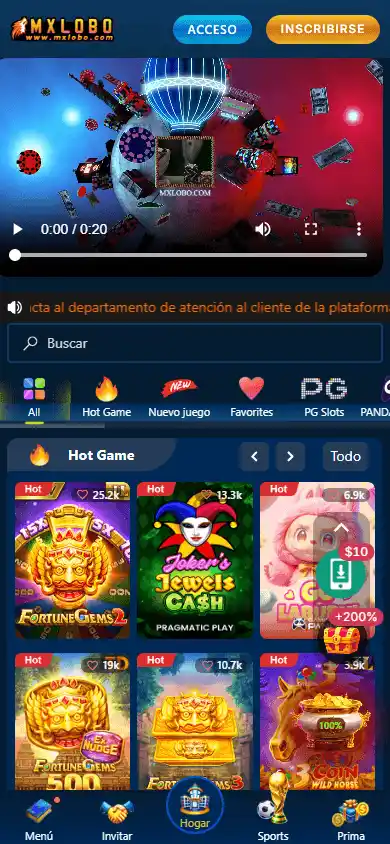 Designed for browsing with your thumb.
In this guide View the topics
A mobile website does not require installing an APK
In the supplied screenshot, the header keeps the logo beside the account shortcuts, and the lobby displays three games per row. The bottom bar brings together the main shortcuts. This design explains why the website can feel familiar on a small screen.
The screenshot documents an earlier state of the website. It does not prove that all devices play games or video correctly. Nor does it establish that the advertised file is a native app: a download button can lead to different formats.
First visit the website using an up-to-date browser and read its terms. If the website lets you view what you need, you do not have to install software to read its public pages. Do not confuse a shortcut with an app distributed through a store.
Browser, shortcut and app
| Format | What it means | Status in this review |
|---|---|---|
| Mobile website | Content opened by the browser | Interface documented in the copy |
| Home screen shortcut | Icon that opens a web address | Depends on the browser and device |
| PWA | Website that supports installation features | Not operationally verified |
| Android APK | Package that installs software | File and signature not verified |
| iOS app | App for the Apple ecosystem | Official listing not verified |
An APK cannot be installed on an iPhone as though it were an iOS app. Adding a website to the home screen also does not guarantee notifications, offline operation or native app capabilities. Avoid attributing features to a product solely because of the shortcut's name.
What to check before downloading
- Start on the correct domain. Do not use an advert, chat or APK repository as proof of origin.
- Identify the developer. Compare their name with the operator's legal information.
- Check the listing. Look for the version, update, privacy policy and compatible devices.
- Examine permissions. Ask why each requested permission is needed.
- Respect system warnings. Do not disable protection to force an installation.
The MXLOBO name and a similar logo do not prove authenticity. If you cannot clearly connect the download to the operator and its developer, do not enter your credentials into it. This review does not host executable files or provide third-party links to install unverified files.
We also do not publish a size in MB, a minimum Android version or an update date without a supporting listing. Those details change and must correspond to the exact file. For an update, return to the same verified channel and check which permissions or terms have changed.
How to browse the lobby with your thumb
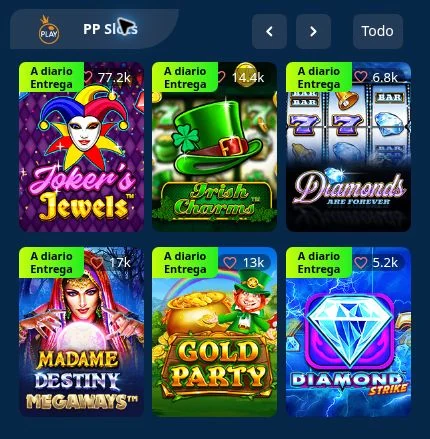
Tabs organise your visit
The file shows provider groups, game cards and controls for browsing each block. You can recognise PG Slots, PP Slots or Jili Slots before opening a cover image. The “All” shortcut identifies the group's view in the preserved interface.
To find a title, use its full name. Joker's Jewels and Joker's Jewels Cash are examples of variants whose names should not be shortened. If the artwork looks similar but the name does not match, return to the list and check the provider.
On a small screen, distinguish the casino's controls from those included in each game. Going back in the browser, closing a window and leaving a round can have different effects. If an operation is pending, check the history before repeating it.
If the page does not load or the game freezes
Start by identifying where the problem occurs: on the homepage, when logging in or when opening a game. That distinction helps avoid unnecessary actions. If a round is in progress, keep its identifier before closing windows or deleting data.
- Check whether other pages load on the same connection.
- Update the browser and return to a single operator tab.
- Check whether a maintenance or territorial restriction message appears.
- Do not interpret an empty screen as permission to use an unknown mirror.
- If the balance does not match, check the history before betting again.
During our check, the domain returned a geographical restriction for the browser used. This does not show that all users encounter the same error. Nor is it a problem that should be solved by bypassing territorial restrictions. Check availability for your location.
If a pop-up is necessary for a game, check its origin first. Do not grant broad permissions to unknown pages. The absence of an app does not oblige you to accept excessive permissions to use your phone.
Payments and support from your phone
A convenient mobile interface does not change deposit or withdrawal conditions. Before confirming a transaction, check the amount, currency and account holder. If you switch from the browser to a banking app, return to the receipt and check the transaction status without automatically repeating it.
Do not publish screenshots showing full reference numbers, banking information or identity documents. If the operator requests a file for KYC, check the channel and purpose. Our review website will not ask for documents or banking codes.
Use the payment guide to distinguish the processing stages. Check the privacy policy and use the help available within your account. Support contacts should not be confused with the independent editorial team.
Frequently asked questions
Is there an official MXLOBO app on Google Play?
This review has not verified an official listing or its developer. We do not treat an app as authentic merely because it shares a name or logo.
Can I install the APK on iPhone?
An APK is an Android package, not an iOS app. For iPhone, you must check a compatible and authorised channel.
Does adding the website to the home screen install an app?
It may create only a shortcut. It does not prove that this is a native app or guarantee PWA features.
Why is there no APK download button here?
We have not validated a file or its signature. The commercial link leads to the operator's domain, without hosting third-party software.